
DVD-quality lessons (including tabs/sheet music) available for immediate viewing on any device.
Take your playing to the next level with the help of a local or online flatpicked guitar teacher.
Monthly newsletter includes free lessons, favorite member content, flatpicked guitar news and more.
Premier Sponsors


|
Please note this is an archived topic, so it is locked and unable to be replied to. You may, however, start a new topic and refer to this topic with a link: http://www.flatpickerhangout.com/archive/7766
Johnboy109 - Posted - 03/03/2009: 17:50:11
OK, A lot of the FPHO members don't have upscale sound recording programs,being challenged enough by the Audacity freeware-so if you have some questions or pointers,pass 'em on.Does anyone know how to get a good effect on the GVerb? It's down at the bottom of the effects list. Supposed to give a big room sound.It's not explained in the Help Section.
"To become old and wise, you have to survive young and stupid"
Edited by - Johnboy109 on 03/03/2009 17:51:42
jetfromtn - Posted - 03/04/2009: 07:11:30
I tried using audacity to record from vinyl to CD. I never was able to split tracks, it was just one long CD. If anyone knows if or how this can be done, please post.
Jim T.
gotaplay - Posted - 03/04/2009: 08:11:05
I am in the process of recording my original " Will the circle be un-broken " album , and although it is very time consuming I am doing one track at a time so I can normalize and clean up each track separately , I also use cakewalk but that's not a " free ware " program .
I got this from the website , this should help
audacity.sourceforge.net/help/...s&i=split
How can I split a long recording into multiple files or CD tracks?
Follow these steps to create a separate file for each song or segment of a long recording. This is particularly useful if you are creating a CD, since each file will appear as a separate track on the CD.
1. Click to place the cursor at the start of the first song.
2. Choose “Add Label at Selection” from the Project menu. If you wish, you can type the name of the song.
3. Repeat steps 1 and 2 for each song.
4. When you are finished, choose “Export Multiple” from the File menu. When you click the “Export” button, Audacity will save each song as a separate file, using the format and location you choose.
A detailed, illustrated tutorial explaining this process is available on the Splitting_recordings_into_separate_tracks page on the Audacity Wiki.
There are those who were blessed with the Talent
The talent to turn steel and wood into a sweet song
And then there are those of us who realize just how much talent they really do have
Johnboy109 - Posted - 03/04/2009: 11:04:06
A useful conversion tool is the AoA WAV to MP3 freeware.Just add a file to it and click start.
"To become old and wise, you have to survive young and stupid"
cabmaker - Posted - 03/08/2009: 13:09:13
I have recorded numerous vinyl albums to CD using Audacity...but i never had a clue how to do it...i would record, then transfer each song one at a time...then delete the 1st track and start the next...it takes a long time...so the advice given here has already helped me a great deal ...THANKS
I would also like to record my own "Jam tracks" for practice purposes, but haven't figured out how to get my guitar into the computer yet...i have a small amp with "line outs"...but i tried once and couldn't get a "signal" on the PC....any help would be appreciated !!! Thanks in advance !
steve-cabmaker
Nathan Patman - Posted - 05/01/2009: 11:29:48
quote:
Originally posted by cabmaker
I have recorded numerous vinyl albums to CD using Audacity...but i never had a clue how to do it...i would record, then transfer each song one at a time...then delete the 1st track and start the next...it takes a long time...so the advice given here has already helped me a great deal ...THANKS
I would also like to record my own "Jam tracks" for practice purposes, but haven't figured out how to get my guitar into the computer yet...i have a small amp with "line outs"...but i tried once and couldn't get a "signal" on the PC....any help would be appreciated !!! Thanks in advance !
steve-cabmaker
Johnboy109 - Posted - 05/22/2009: 07:04:39
quote:If you get no sound from your computer,right click the speaker icon(usually in the lower tool bar)to open the speaker control panel. Look for the line-in slider and raise it to about 8.
Originally posted by Nathan Patman
[quote]Originally posted by cabmaker
I would also like to record my own "Jam tracks" for practice purposes, but haven't figured out how to get my guitar into the computer yet...i have a small amp with "line outs"...but i tried once and couldn't get a "signal" on the PC....any help would be appreciated !!! Thanks in advance
fiddlepogo - Posted - 05/24/2009: 12:03:30
You need to download the Steinberg SDK (Softward Developer's Kit).
It's free- link is on the Audacity site.
Then you will be able to use VST plug ins.
Then download the AMBIENCE reverb VST plug-in.
It's MUCH better than the GVerb. Link is on the Audacity site
You also need to download the LAME library file, so you can export
Audacity recordings to mp3 format- Audacity doesn't come with that ability in it's downloaded form- you have to add it yourself. Again, the link is on the Audacity site (sourceforge.net)
Michael
fiddlepogo - Posted - 05/24/2009: 12:06:06
A very handy feature of Audacity if you multitrack and have a slow interface is the
"align tracks" function.
After you record the second track select both tracks (select all if that's all there are)
and click on "align tracks".
This gets rid of the latency between tracks.
Michael
Flatpicker - Posted - 05/24/2009: 12:51:37
quote:
Originally posted by fiddlepogo
A very handy feature of Audacity if you multitrack and have a slow interface is the
"align tracks" function.
After you record the second track select both tracks (select all if that's all there are)
and click on "align tracks".
This gets rid of the latency between tracks.
Michael
mrNatchl - Posted - 06/15/2009: 02:11:48
I started getting much better results out of Audacity when I started using these free VSD plugins: kjaerhusaudio.com/classic-series.php. I use Classic, Reverb, Compressor, and EQ. Much better than what ships with Audacity. In Audacity you will not see the fancy device-like interface shown on the plugin site, but the effects work fine.
A friend of mine in the States who does pretty serious acoustic music recording highly recommends using a good audio-to-digital (AD) interface with good preamps. For "amaterurs" like me he has pointed out a couple of Edirol models (made by Roland). I've not yet acquired one so I can't speak to how much it really improves recording quality. The thing that will improve mine more than anything is a better guitar. 
<robert>
mrNatchl - Posted - 06/15/2009: 02:24:22
I should have said in my previous post: To apply any effect to a track in Audacity, you have to select (highlight) the track, then select the effect you want in the Effects menu. For vocals, I generally apply e.g. reverb to all vocals at once, though sometimes I will reverb the lead vocal track separately from backing vocal tracks. I generally apply effect to each segment of a vocal track or tracks, and use the Generate Silence feature for the space in between vocals. Same with instruments recorded with a mic. Unless you havea super quiet environment you'll have some amount of noise. Injecting silence into mic-recorded tracks reduces the overall amount of noise.
I definitely apply effects to guitar tracks separately from vocals, etc. For compression, I will generally export the final mix to a WAV file, apply commpression to the whole mix and then export that to MP3. Sometimes that takes several tries because MP3 does its own brand of compression which subtly changes the sound. It can be noticeable in pure acoustic music, though I have to say my aging eardrums don't detect as much difference as they used to.
<robert>
robbif - Posted - 09/04/2009: 17:47:41
New Beta version of Audacity, 1.39 Sept. 1
audacity.sourceforge.net/
robbif - Posted - 12/03/2009: 19:57:37
New Audacity Beta version (1.3.10) available
audacity.sourceforge.net/
quote:
1.3.10 is strongly recommended for users on Windows Vista and 7, rather than 1.2.6 Stable.
robbif - Posted - 12/09/2009: 12:50:53
If anyone would like a cool, free retro VU Meter program to impress everyone while you're recording, check out vuplayer.com/other.php
It looks like this...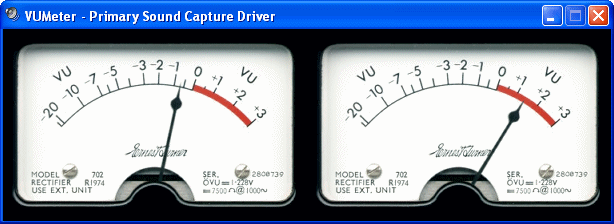
robbif - Posted - 01/20/2010: 06:51:18
New Beta version 1.3.11 January 18 - bug fixes from 1.3.10
quote:
...provisional support for Windows 7 and is also strongly recommended for Windows Vista and Mac OS X 10.6, rather than 1.2 Stable.
TN.Frank - Posted - 01/20/2010: 20:18:59
Is there a way to play back a track that I recorded and record a second track while I play along with the first?
I'd like to lay down a rythem track the play it back and while I'm listening to it lay down a lead track too but I don't know how to do this.
robbif - Posted - 01/25/2010: 15:09:56
quote:
Originally posted by TN.Frank
Is there a way to play back a track that I recorded and record a second track while I play along with the first?
I'd like to lay down a rythem track the play it back and while I'm listening to it lay down a lead track too but I don't know how to do this.
robbif - Posted - 04/02/2010: 16:52:10
The Audacity Team is pleased to announce the release of Audacity 1.3.12 (Beta) for Windows, Mac and Linux/Unix. There are some important bug fixes and improvements, especially for dragging and synchronization of labels.
We continue to recommend the ongoing Beta series for Windows 7, Windows Vista and Mac OS X 10.6, rather than 1.2. Advanced users are encouraged to test our subsequent changes as we make them by downloading our Nightly Builds:
wiki.audacityteam.org/index.ph...ly_Builds
Please send all bug reports for 1.3.12 and Nightly Builds to our feedback address (audacity.sourceforge.net/contact/#feedback) informing us what operating system you are on.
Beta releases are still ongoing at present. If you are not already doing so, please subscribe at audacity.sourceforge.net/#announce to receive news of all our future releases.
Summary of Changes in 1.3.12:
Bug fixes for:
* Cutting or deleting a region in the waveform and label track did not move the labels in advance of the cut
* Incorrect behavior snapping to labels and boundaries with Snap To enabled
* Projects froze if files imported via On-Demand were no longer available
* (Windows 7) Clicking in a file open or save dialog caused files or folders to disappear from the list, and file filtering was broken
* Other import/export, effects and crash fixes
Changes and Improvements:
* A hover tooltip is now provided if the Mixer Toolbar input selector cannot control the system slider for the selected input
* More intuitive behavior when moving and resizing labels by dragging
* Export Multiple: new option to use a numerical prefix before existing label or track names
* New Equalization preset "Inverse RIAA", with new button to invert other curves
* New Preferences choice for "System" language which is used on first run instead of asking user to choose language
Note: This release supports Windows 98/ME, and we recommend users on those systems to upgrade from the previous 1.3.7 release.
To upgrade, download audacity-win-1.3.12.exe or audacity-win-1.3.12.zip from sourceforge.net/projects/audacity/files/
Tom Smith - Posted - 11/16/2010: 03:15:16
I recorded a tune last night that came out pretty good, so I converted it to MP3 for upload. The resulting MP3 file has "skips" in it. When I play the Audacity version, it plays fine, but the resultant MP3 file has spots where the sound drops out. Any Ideas as to what I'm doing wrong?
ccravens - Posted - 11/16/2010: 17:57:52
Have you tried exporting the file from Audacity as a wave file, then using a different program (not audacity) to convert to MP3?
That's the way I do it.
ccravens - Posted - 11/18/2010: 06:01:29
There are plenty of free programs that will do this on the internet.
I use Akram Audio Converter. Quick and esasy.
Grumpy1 - Posted - 11/21/2010: 22:33:09
would also like to record my own "Jam tracks" for practice purposes, but haven't figured out how to get my guitar into the computer yet...i have a small amp with "line outs"...but i tried once and couldn't get a "signal" on the PC....any help would be appreciated !!! Thanks in advance !
steve-cabmaker
-------------------------------------------------------------- # ------------------------------------------------- # --------------------------------------------------
I once in a while will try recording a banjo tune and download it into Audacity then add a guitar track. The way I do it is to simply record the guitar track, using my little hand held recorder, as I listen to the previously loaded banjo tune with earphones. I then download the guitar recording to Audacity. I then import both into a Project file and adjust as required. I find it quite time consuming and I'm not patient enough but you can get them alinged and sounding fairly well. The trick, at least for me, is the recording level and which instrument I want to be dominant. That and leaving space for one or the other to solo. I also like to try and blend in a bit of harmonica which is suprisingly, the easisest part as I can just play it along with one or the other instrument using a neck holder or add it later. I like to add the solo later as I can can more completely play it when hand holding. Again, the space for a solo must be taken into consideration. No matter, it has opened my eyes as to why recording sound technicians are so, so necessary for proffesional results. I never post one of these as I haven't gotten one I'm truly satisfied with yet, but I'll keep trying.
robbif - Posted - 11/24/2010: 08:08:28
Before converting to MP3 did you check/set the compression quality?
Go to Edit/Preferences/File Formats/MP3 Export setup/Bit Rate
I'd say the minimum should be 96.
delboy - Posted - 11/25/2010: 05:55:38
Anyone got a method of stripping out just the left or right channel from a recording? Maybe using Audacity or Transcribe or ANother system? What I'd like to do is to take some of the learning package CDs that I've got (e.g SK's PLP) and create my own backing tracks that I can then record over. I can then compare where and why my performance is sounding different to the originals...
Thanks,
Derek
robbif - Posted - 11/27/2010: 07:46:27
Derek,
In the gray box at the left of the 2 tracks, click on the little down arrow and select on Split Stereo Track.
From there you should be able to work with either left or right independently.
delboy - Posted - 12/19/2010: 00:57:35
Tremendous!! Thanks Robbif.
Apologies for the late reply - only just seen your response. Now started using the "subscribe to this thread" option.
Merry Christmas,
Derek
robbif - Posted - 04/12/2011: 13:45:55
The Audacity Team is pleased to announce the release of Audacity 1.3.13
(Beta) for Windows, Mac and Linux/Unix. This version now fully supports
Windows 7 and contains many bug fixes plus a few new features.
Please also use this version for Windows Vista and Mac OS X 10.6 rather
than Audacity 1.2.
Download 1.3.13 (Beta):
http://audacity.sourceforge.
Release Notes:
http://wiki.audacityteam.org/
You can install Audacity Beta on the same computer as Audacity 1.2 if
you install to different directories. If you are upgrading from a previous
Beta release, you can install "over the top" into the same directory.
Please give us your feedback on 1.3.13 (Beta) by writing to our feedback
address:
http://audacity.sourceforge.
are on (for example, Windows 7 x64 SP1). For our latest code, you can
also try our Nightly Builds:
http://audacityteam.org/wiki/
Your help will enable us to progress as rapidly as possible towards a new
Audacity 2.0 stable version.
If you have questions about any of the changes in 1.3.13, please don't
hesitate to write to our Forum:
http://forum.audacityteam.org/
We plan to release 1.3.14 (Beta) in two months. To receive an e-mail when we
release new versions of Audacity, please subscribe to our announcements
mailing list at the bottom of our home page:
http://audacity.sourceforge.
To subscribe, enter your e-mail address and click "Add".
We hope you enjoy 1.3.13.
robbif - Posted - 03/15/2012: 15:34:01
Major release of Audacity version 2.0, replaces all other versions. Click here.
banjo_brad - Posted - 03/15/2012: 18:47:16
robbif -
Do you have anything to do with the program? I'm asking because I would dearly like to see a comprehensive Users Manual in PDF format for the program. I have tried the html help files and find that they really don't do a proper job of explaining how to use the program. If you need an example of what I'm talking about, take a look at the users manual available for Tabledit.
robbif - Posted - 03/15/2012: 19:00:17
Brad,
Sorry to say I'm just an enthusiastic user.
I know what you mean about the documentation, but for the price, it's worth plowing through.
You might check out, and contribute to the Audacity Forum.
Fred
robbif - Posted - 01/22/2013: 05:46:58
Audacity Team (http://audacity.sourceforge.
Audacity 2.0.3 now uses the libsoxr resampling library by default, instead of libresample, for higher quality and speed. Time Tracks have been improved and bug fixed, and new effects include an accessible Adjustable Fade. See the 2.0.3 Release Notes for details.
robbif - Posted - 09/19/2013: 05:28:50
| 3:36 AM (4 hours ago)  | |||
Terms of Use | Privacy Policy | Privacy Consent (EU/GDPR Only)
Copyright 2026 Flatpicker Hangout. All Rights Reserved.


